Nest Parts (Nest)
Nests flat parts onto stock sheets with minimal waste. Parts pack against their true outlines (concave shapes interlock), honor a spacing gap derived from the material thickness (or an override), and rotate in fixed steps. Parts of different thickness are automatically nested onto separate sheets. When parts don't fit on one sheet, additional sheets are opened; parts that fit on no sheet are reported as unplaced.
Nesting decides where each part sits on which sheet. You give it flat parts and the
stock you have; it returns placement planes you can use to orient the real geometry.
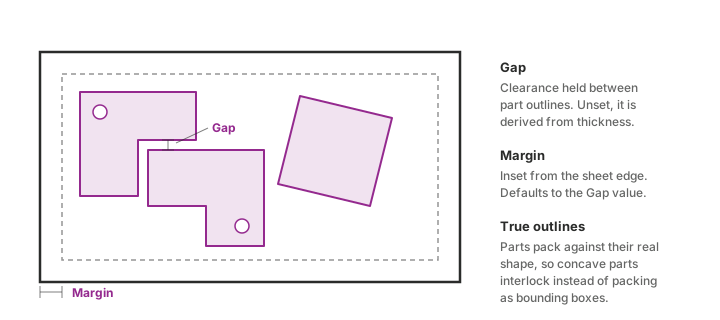
Parts pack against their true outlines, not their bounding boxes, so an L-shape nests
into the notch of another L-shape. Two spacings control the packing: the Gap between
neighbouring outlines, and the Margin inset from the sheet edge. Leave Gap unset and it
is derived from the material thickness.
Parts of different thickness never share a sheet. They are split into groups and nested
separately, so a 2 mm part can never land on a 3 mm sheet.
Inputs
| Name | Nick | Type | Access | Default | Description |
|---|---|---|---|---|---|
| Parts | P | Generic | tree | Parts to nest: Unroll Results (from the Unroller component) or closed planar curves in the XY plane. | |
| Stock | S | Generic | tree | The sheets you can cut from. Use Sheet Stock to describe each one with its size, thickness, count and remnant flag; a plain rectangle also works and is treated as unlimited stock of any thickness. | |
| Quantities | Q | Integer | tree | How many copies of each part to place. One value per part, or a single value for all (default 1). | |
| Gap | G | Number | item | Gap between part outlines, in document units. Leave unset to derive it automatically from the material thickness (thicker material → wider gap). | |
| Margin | M | Number | item | Usable-area inset from the sheet edge, in document units. Defaults to the Gap value. | |
| Rotation Steps | RS | Integer | item | 8 | Number of rotation steps to try per part: 8 = 45° steps (default), 4 = 90° steps, 1 = no rotation. |
| Min Hole Area | MHA | Number | item | 100 | Holes smaller than this area are ignored by the nesting logic (they are still cut). Larger values speed up nesting of parts with many small holes (default 100). |
| Optimize | Opt | Boolean | item | false | Deep optimize: searches part order and rotations with a genetic algorithm for the given time budget. Better yield, slower. Off = quick greedy mode (default). |
| Time Budget | TB | Number | item | 10 | Time budget for deep optimization in seconds, per material/thickness group (default 10). Ignored in quick mode. |
| Separate Parts | Sep | Boolean | item | false | Keep each part type on its own sheets: copies of a part may share a sheet, but two different parts never do. Easier sorting at the machine, lower yield (default false). |
Outputs
| Name | Nick | Type | Access | Default | Description |
|---|---|---|---|---|---|
| Outlines | O | Curve | tree | Placed part curves in the preview layout. Each part comes back on the path it went in on, with one extra level for the copy: a part at {0;3} wanted three times comes back as {0;3;0}, {0;3;1} and {0;3;2}. The first curve in a branch is the silhouette, the rest are its holes. Transform and On Sheet share these paths. | |
| Sheet Frames | F | Rectangle | tree | The outline of every sheet used, in the same preview layout. One branch per sheet, at path {sheet}. Use the On Sheet output to tell which parts are on which. | |
| Transform | X | Transform | tree | The transform that takes each part from its incoming position to its placed position, on the same path as Outlines. Feed it and your own geometry into Transform to move anything the outlines leave behind: a solid, a marking line drawn on the flat, drill points, tags. For Orient, transform a World XY plane by it. | |
| On Sheet | OS | Integer | tree | Which sheet each placed copy landed on, on the same path as Outlines. The number is the branch index of Sheet Frames, so this is the map from your parts to the sheets they were nested onto. | |
| Info | I | Text | item | Job summary: sheets used, yield, unplaced parts. | |
| Unplaced | U | Text | list | Parts that could not be placed, with the reason. Empty when everything fits. | |
| Result | Res | Generic | item | The full nesting result object (sheets, placements, source curves, sheet size/gauge) in true sheet-local coordinates, for downstream CNC/machine-file tooling. |
Sheet Stock (Stock)
Describes one sheet you can cut from: its size, how thick it is, how many you have, and whether it is an offcut. Feed several into Nest Parts to describe a whole rack. Keeping each sheet's details together means they cannot drift out of step the way separate lists do.
Inputs
| Name | Nick | Type | Access | Default | Description |
|---|---|---|---|---|---|
| Shape | S | Generic | item | The sheet, as a rectangle or a closed curve. A curve lets you describe an offcut with its real outline. Note that parts are currently packed inside the shape's bounding box, so a concave offcut is treated as the rectangle around it. | |
| Thickness | T | Number | item | 0 | How thick this stock is. Parts are only nested onto stock of their own thickness, and each thickness gets its own sheet count. Leave unset for stock that serves any thickness. |
| Material | M | Text | item | What this stock is made of, for example "S235". Parts are only nested onto stock of their own material. Leave empty for stock that serves any material. | |
| Quantity | Q | Integer | item | 0 | How many sheets of this kind you have. 0 or less means as many as needed (default), which is what you want for stock you can reorder. |
| Remnant | R | Boolean | item | false | Marks this as leftover scrap you already have, rather than fresh stock you would buy. Remnants get used up before any standard stock, so odd offcuts leave the rack instead of sitting there. |
| Margin | Mg | Number | item | Unusable border around this sheet's edge, if it differs from the job's Margin. Leave unset to use the job's value. |
Outputs
| Name | Nick | Type | Access | Default | Description |
|---|---|---|---|---|---|
| Stock | S | Sheet Stock | item | One stock sheet, ready for the nester's Stock input. |
One object per sheet
Each sheet's details travel together, so they cannot fall out of step:
[Sheet Stock]  2500x1250  t=2  Q=10          ─┐
[Sheet Stock]  2000x1000  t=3  Q=4           ─┼─→ Stock ─→ [Nest Parts]
[Sheet Stock]  offcut     t=2  Q=1  Remnant  ─┘
Previously this took four separate lists on the nester, lined up by position. Insert one
sheet in the middle of the list and every count after it silently shifted.
A plain rectangle still works if you do not need the detail. It is treated as unlimited
stock that serves any thickness.
Offcuts with a real shape
Shape accepts a closed curve, not just a rectangle, so an offcut can carry its true
outline for reporting and preview.
One limit to know: parts are still packed inside the shape's bounding box. A concave
offcut, an L shape say, will be filled as though it were the full rectangle around it, so
parts can land in the missing corner. The component warns when you give it a shaped
outline. Until the packer understands outlines, treat a shaped offcut as the largest
rectangle you can actually cut from it.
Tracking parts through the nest
The nester rearranges your parts, but the outputs come back on the paths you sent in.
A part at {0;3} comes back at {0;3;0}, with one extra level for the copy.
| Output | Path | What one branch holds |
|---|---|---|
| Outlines (O) | {your path; copy} | The silhouette first, then that part's holes |
| Transform (X) | {your path; copy} | One transform |
| On Sheet (OS) | {your path; copy} | One integer: the sheet it landed on |
| Sheet Frames (F) | {sheet} | One rectangle |
So a tree of parts in gives the same tree out. No lookup, no index to match up: whatever
you fed into branch {2;7} comes back under {2;7}.
Parts in          Outlines out
  {0;0}      ->     {0;0;0}
  {0;1}      ->     {0;1;0}
  ...               ...
  {2;8}      ->     {2;8;0}
The extra level is the copy number. Ask for one of each and every branch ends in ;0;
ask for three of the part at {0;3} and you get {0;3;0}, {0;3;1}, {0;3;2}.
#### Which sheet did it land on
On Sheet (OS) is the map. It sits on the same paths as everything else and gives the index
of the sheet each copy went onto, matching the branch order of Sheet Frames.
To pull out everything on sheet 2, cull by that value rather than by path. To count parts
per sheet, group by it.
Sheet number is deliberately *not* a path level. Keying the output by sheet would produce
paths like {2;7} that look exactly like your input tree but mean something completely
different, and wiring the two together would silently pair up the wrong parts.
#### Moving more than the outlines
Outlines (O) only gives you curves. When you have something else that belongs on the
part, a marking line you drew on the flat pattern, drill points, the 3D solid, use
Transform (X):
[your line on the flat] ──┐
                          ├─→ (Transform) ─→ it lands on the nested part
[Nest] Transform (X) ─────┘
Because Transform comes back on your own paths, a line you made for the part at {0;3}
matches the transform at {0;3;0} directly.
For Orient, transform a World XY plane by it: the plane and the transform describe the
same move.
Mixed thicknesses on one job
Parts of different thickness are never nested onto the same sheet. They are split into
groups by material and thickness, and each group gets its own sheets.
For that to be counted correctly, the nester has to know what thickness each stock sheet
carries. Set Thickness on each Sheet Stock:
[Sheet Stock]  2500x1250  t=2  Q=10   ─┐
                                      ├─→ Stock ─→ [Nest Parts]
[Sheet Stock]  2000x1000  t=3  Q=4    ─┘
Leave Thickness unset and that sheet serves any thickness. That is what you want
for a single-thickness job, but on a mixed job it means a quantity of 10 is available to
*each* thickness separately, not to the job as a whole. The nester warns when it spots
that combination.
Thickness comes from the parts automatically when they arrive as Unroll Results, so you
normally only set it on the stock side.
To see which sheet is which, read the label under each sheet in the viewport, or take the
per-sheet lines from Info (I).
Remnants: using up your offcuts
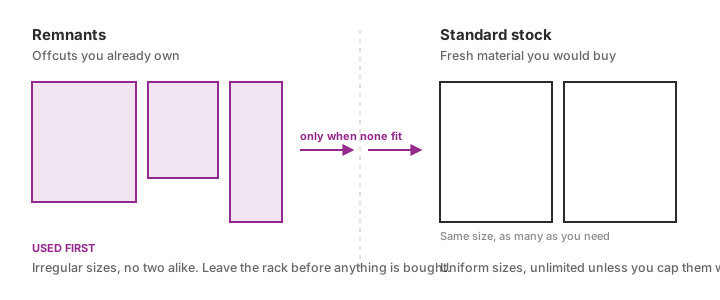
A remnant is scrap you already have, rather than fresh stock you would buy. Mark a sheet
size as a remnant and it gets used before any standard stock, so odd offcuts leave the rack
instead of sitting there.
This matters most when an offcut is *larger* than a standard sheet. Without the remnant
flag, the nester opens the smaller standard sheet first and your big offcut never gets
touched.
Set Remnant on the Sheet Stock for that sheet. It travels with the sheet, so it
cannot end up describing a different size.
A worked stock list
Say you buy 2500 × 1250 sheets, and you have two offcuts left from an earlier job.
| Sheet Stock | Size | Quantity | Remnant |
|---|---|---|---|
| standard stock | 2500×1250 | 0 | false |
| offcut | 1200×700 | 1 | true |
| offcut | 800×560 | 1 | true |
0 means unlimited, which is what you want for stock you can reorder. The offcuts are
capped at 1 because you only own one of each. The nester fills both offcuts first, then
opens as many 2500 × 1250 sheets as the job needs.
Quick mode and deep optimize
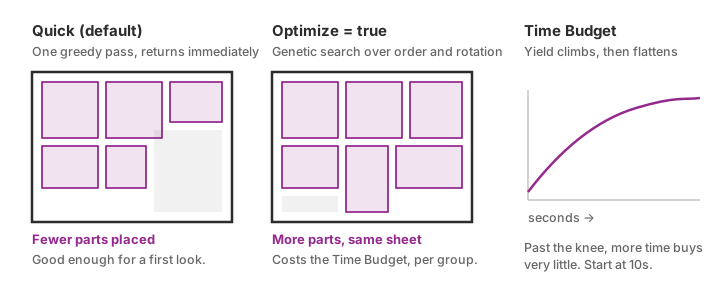
By default the nester runs a single greedy pass and returns immediately. Switch Optimize
on and it searches part order and rotations with a genetic algorithm until the **Time
Budget** runs out, which usually buys a noticeably better yield.
The budget is spent *per thickness group*, not for the whole job. Four different materials
at a 10 second budget is up to 40 seconds of solving. Yield climbs steeply at first and then
flattens, so raising the budget far past the default rarely pays for itself.
Reading the Unplaced output
Unplaced (U) is empty when everything fits. Any entry means a part never made it onto a
sheet, with the reason:
- The part is larger than every available sheet. Check that Gap and Margin have not
- Stock ran out. Every sheet size hit its Sheet Quantities cap. Raise a cap, or set one
0 for unlimited.
Always check this output before sending a job to the machine. The Info (I) output gives
the job summary alongside it: sheets used, yield, and unplaced count.
Tips
- Rotation Steps trades yield for grain direction.
8(45° steps) is the default,4
1 disables rotation entirely: use it when the material has a grain
or finish direction you must respect.
- Min Hole Area speeds up parts with many small holes. Holes below the threshold are
- Separate Parts keeps each part type on its own sheets. Sorting at the machine gets
- The Result (Res) output carries the full nesting result in true sheet-local